Azure Load Balancer & Application Gateway
The Traffic Cops of the Cloud
Simply Put...
Imagine you have a very popular ice cream shop with many customers. If you only have one person serving ice cream, the line will get very long, and customers will get unhappy. To solve this, you hire more people to serve ice cream. Now, you need someone to direct the customers to the server who is available. That's what a load balancer does! It's like a friendly traffic cop for your website or application, making sure no single server gets too overwhelmed. Now, let's say your ice cream shop has different flavors, and some customers want chocolate while others want vanilla. An Application Gateway is like a super-smart traffic cop who not only directs customers to an available server but also knows which server has the flavor they want. It can look at the customer's order (the web traffic) and send them to the right place. It can also check for any troublemakers (hackers) and stop them at the door, keeping your ice cream shop safe!
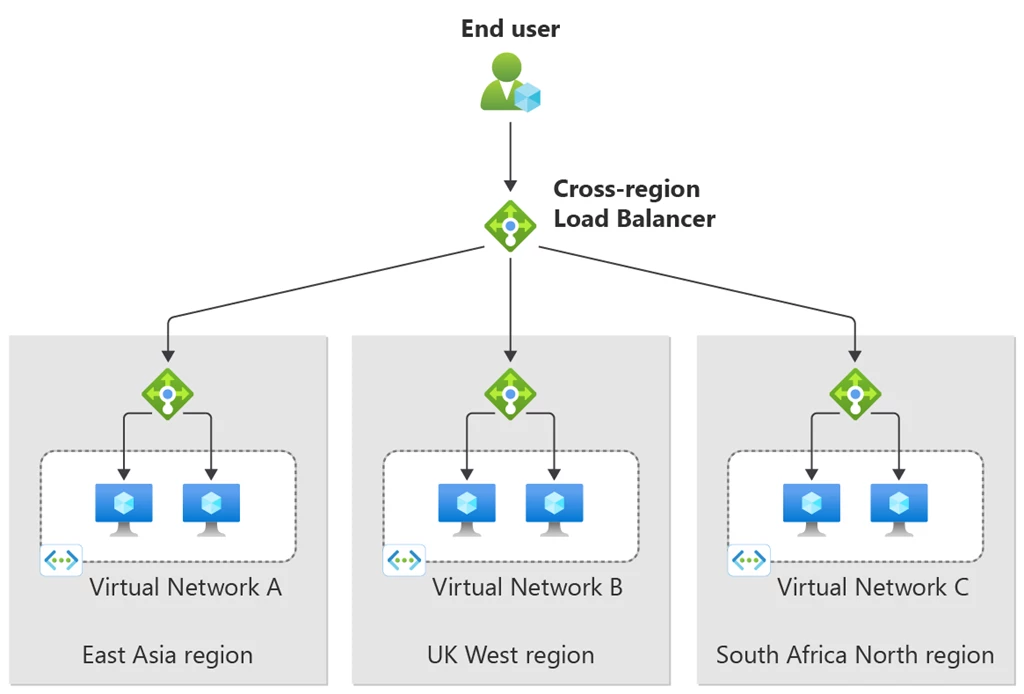
How it Works
Azure Load Balancer operates at Layer 4 (Transport Layer) of the OSI model. It distributes incoming network traffic across a group of backend resources or servers based on a 5-tuple hash (source IP, source port, destination IP, destination port, and protocol type). When a request arrives at the Load Balancer's frontend IP, it uses the load balancing rules and health probe status to select an available backend instance and forwards the traffic to it. This provides high availability and scalability for applications. Azure Application Gateway, on the other hand, operates at Layer 7 (Application Layer). It acts as a reverse proxy and makes routing decisions based on the attributes of an HTTP request, such as the URL path or host headers. When a request hits the Application Gateway's frontend IP, the listener receives it. The request routing rule then inspects the request and, based on the configuration, forwards it to the appropriate backend pool. The Application Gateway can also terminate the SSL/TLS connection, inspect the traffic for security threats with its Web Application Firewall (WAF), and then send the unencrypted traffic to the backend servers.
Scalability Superpowers
Both Azure Load Balancer and Application Gateway provide significant scalability benefits. By distributing incoming traffic across multiple backend instances, they prevent any single server from becoming a bottleneck. This allows you to scale your application horizontally by adding or removing backend instances as needed to handle fluctuations in traffic. The Application Gateway's Standard_v2 SKU also offers autoscaling, which automatically adjusts the gateway's capacity based on the current traffic load. This ensures that you have the right amount of resources to handle the traffic without manual intervention, optimizing both performance and cost.
Key Parts
- Azure Load Balancer: Frontend IP Configuration, Backend Pool, Health Probes, Load Balancing Rules.
- Azure Application Gateway: Frontend IP Addresses, Listeners, Request Routing Rules, Backend Pools, HTTP Settings, Web Application Firewall (WAF).
Security Features
- 🛡️Network-level isolation: Azure Load Balancer allows you to place your backend resources in a private virtual network.
- 🛡️Web Application Firewall (WAF): Offers centralized protection of your web applications from common exploits and vulnerabilities, such as SQL injection and cross-site scripting. It uses rules from the Open Web Application Security Project (OWASP) core rule sets.
- 🛡️SSL/TLS Termination: The Application Gateway can decrypt traffic at the gateway, allowing it to inspect for threats before forwarding to the backend. It can also re-encrypt the traffic for end-to-end encryption.
- 🛡️DDoS Protection: Can be integrated with Azure DDoS Protection Standard for enhanced protection against Distributed Denial of Service attacks.