Azure Virtual Network (VNet)
The Foundation of Your Cloud Castle
Simply Put...
Imagine your house is a private, secure network in the cloud. This is your Azure Virtual Network. Inside your house, you have different rooms, which are like subnets. You can place your toys (your applications and virtual machines) in these rooms. They can talk to each other within the house. If you want to talk to your friends outside (the internet), you can open a window (a public IP address). You can also build a secret tunnel (a VPN) to connect your house to your friend's house (your on-premises network) so you can share toys securely.
How it Works
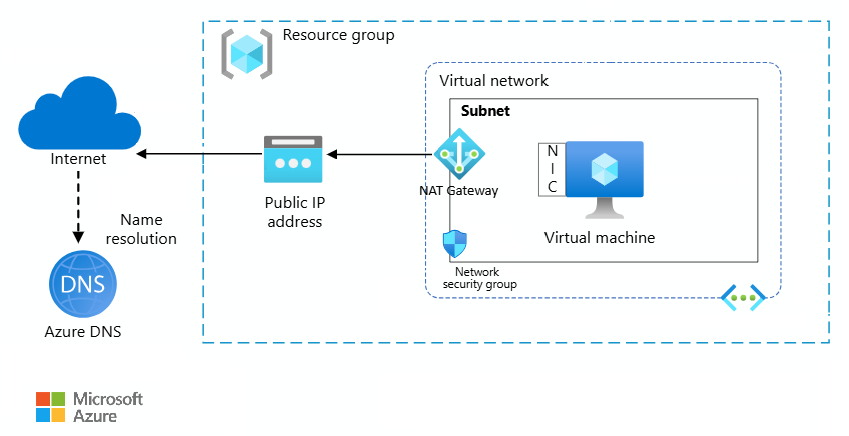
A VNet is a logically isolated network within Azure. You define a private IP address space, and then you can create one or more subnets within that VNet. Each subnet has a portion of the VNet's address space. You can then deploy Azure resources, like VMs, into these subnets. Communication between resources in the same VNet is allowed by default. You can control traffic flow between subnets and to and from the internet using Network Security Groups and Route Tables. To connect to on-premises networks, you can use a VPN Gateway or ExpressRoute, which creates a secure connection between your corporate network and your Azure VNet.
Scalability Superpowers
Azure VNets are highly scalable. You can create large address spaces and multiple subnets to accommodate a growing number of resources. You can also peer VNets together, both in the same region and in different regions, to create a global network. This allows you to scale your applications and services across the globe while maintaining a single, private network.
Key Parts
- Address Space: A private IP address range (e.g., 10.0.0.0/16) that you define for your VNet.
- Subnets: Divisions of your VNet's address space. You can place Azure resources in specific subnets.
- Network Security Groups (NSGs): Act as a firewall to control inbound and outbound traffic to network interfaces (NICs), VMs, and subnets.
- Route Tables: Define how traffic is routed between subnets, VNets, and on-premises networks.
- Gateways: Connect your VNet to other networks, such as the internet (Internet Gateway) or your on-premises network (VPN Gateway or ExpressRoute).
Security Features
- 🛡️Network Security Groups (NSGs): Filter traffic to and from Azure resources in an Azure virtual network.
- 🛡️Application Security Groups (ASGs): Group servers with similar functions, simplifying the definition of network security policies.
- 🛡️Virtual Network Service Endpoints: Secure Azure service resources to your virtual network.
- 🛡️Azure Private Link: Enables you to access Azure PaaS Services (for example, Azure Storage and SQL Database) and Azure hosted customer-owned/partner services over a private endpoint in your virtual network.
- 🛡️Network Virtual Appliances (NVAs): Virtual machines that perform a network function, such as a firewall or WAN optimization.